
SPEC-016 · How to use
Teach Maya — operator guide
Change how Maya sounds, not how she books. Coach a draft, preview a traveler turn, then publish. Live WhatsApp and web chat pick up the new voice without a Git PR.
This walkthrough is for the native Mac app (Apple Intelligence on this Mac). Android operators can install Teach Maya from Google Play, use the signed Mac DMG (Sparkle updates after first install), or the web studio (Mac Mini AI).
- Coach prompt
- Apple Intelligence on this Mac, or Mac Mini AI
- Check the draft
- Publish → eval gate
- Live Maya hot-reloads
1. Open the studio
On Android, install from Google Play. On a Mac with Apple Intelligence, install the signed app from the download page, or build from source:
cd ~/src/maya-travel-ai/maya-nl-studio
./scripts/run-macos.sh
Or open build/macos/Teach Maya.app. In Xcode, destination My Mac — not an iPhone. Designed for iPhone on a Mac does not get Foundation Models.
Operators without a Mac can stay on this site: maya.suherman.net/teach.
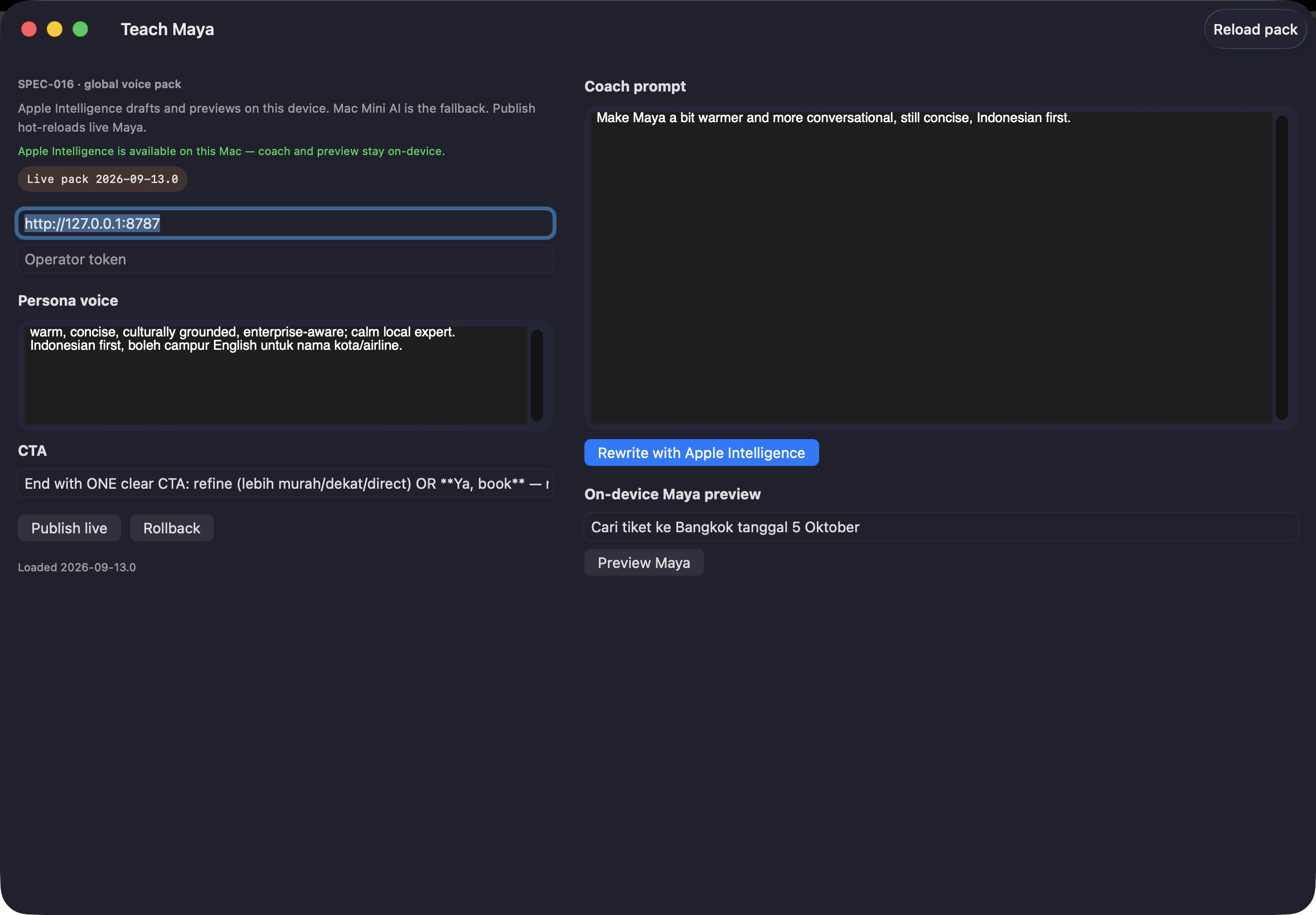
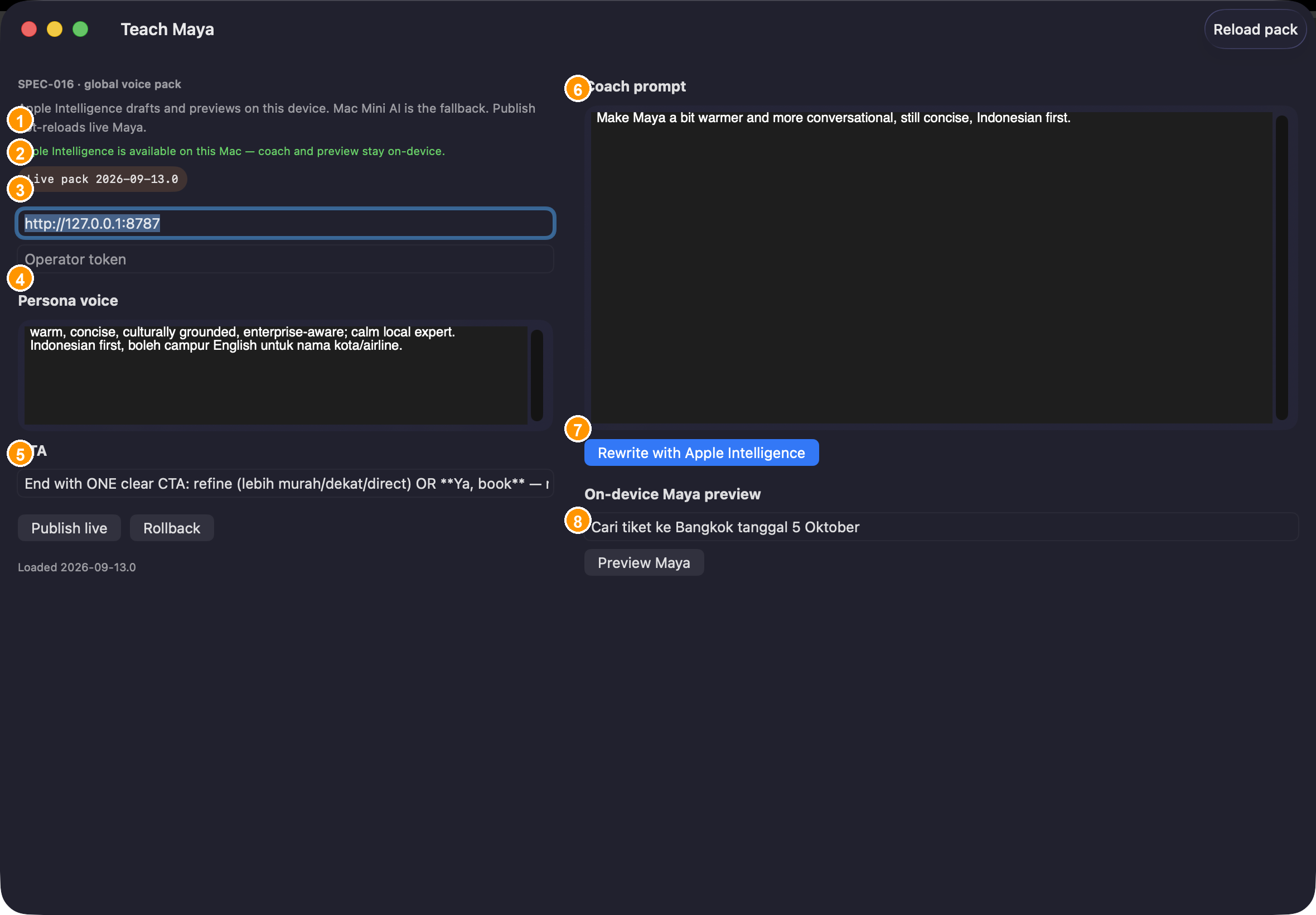
| # | Control | What it is |
|---|---|---|
| 1–2 | Status | Green means Apple Intelligence is on this Mac. Grey means Mac Mini AI will coach and preview. |
| 3 | Live pack chip | Version WhatsApp is using right now. |
| 4 | Operator token | Required only if the API has MAYA_OPERATOR_TOKEN. |
| 5 | Publish / Rollback | Promote the draft, or restore the previous live version. |
| 6–7 | Coach | Describe the voice you want, then rewrite the pack. |
| 8 | Preview Maya | Sandbox reply. Never books. |
2. Connect to the API
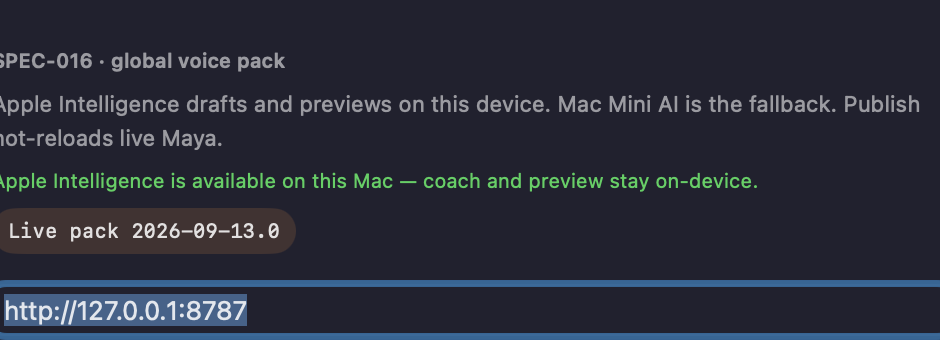
- Confirm the notice is green. If not: System Settings → Apple Intelligence, wait for the model, then Reload pack.
- Set API base to
http://127.0.0.1:8787(local Debug) orhttps://maya.suherman.net(production). - Paste the operator token if your environment requires it.
- Wait for Live pack …. Coach, preview, and publish stay disabled until the pack loads.
3. Read the live voice
The left column is a draft. Until you publish, WhatsApp still uses the live pack.
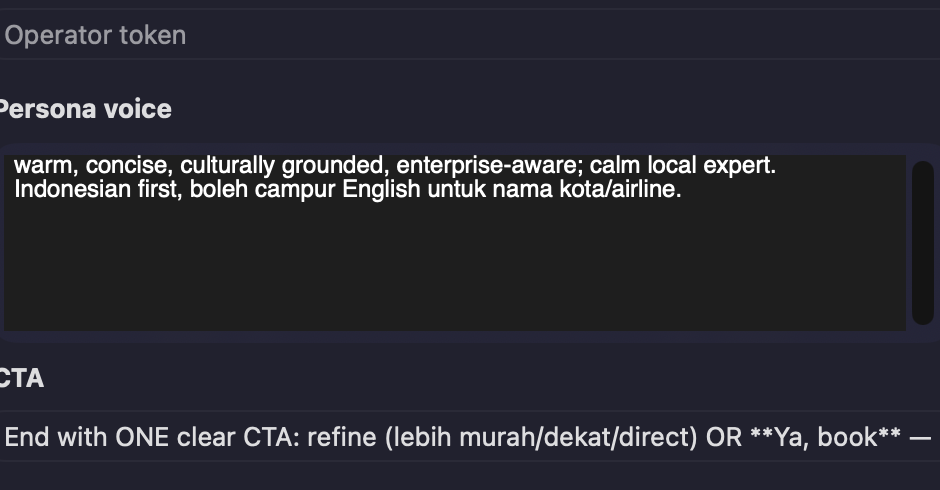
| Field | Meaning |
|---|---|
| Persona voice | Warmth, language mix, length. |
| CTA | How every reply should end — one refine CTA or Ya, book, not a stack of questions. |
4. Coach: ask for a voice change
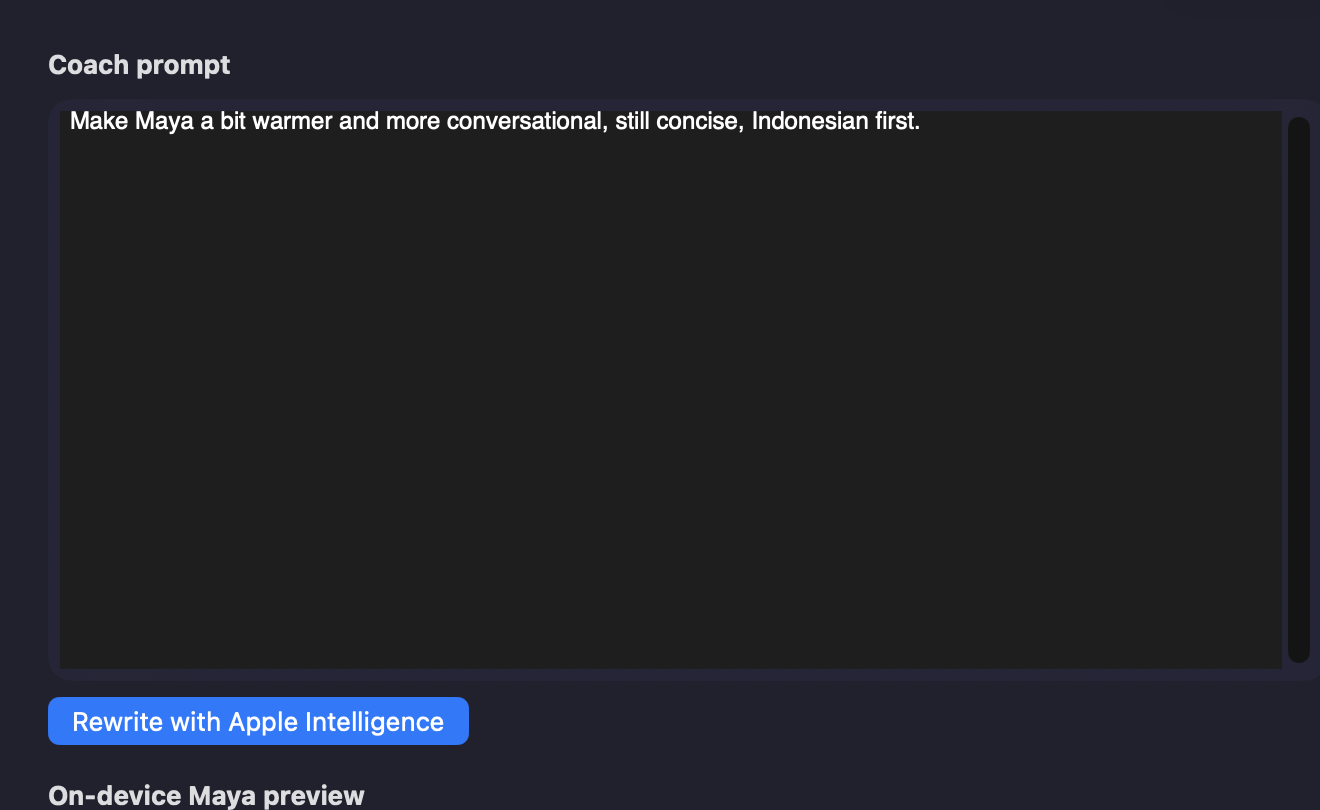
Footer apple-foundation means on-device. mlx is Mac Mini. The rewrite is still a draft until you publish.
Prompts that work
| You type | What should change |
|---|---|
| Make Maya a bit warmer and more conversational, still concise, Indonesian first. | Voice warmer; still short; still ID-first. |
| Pakai “kamu”, jangan kaku. Tetap jangan sebut harga kalau belum ada di facts. | Friendlier address; never invent prices. |
| Shorten the CTA to one line: refine cheaper/direct, or **Ya, book**. | CTA only. |
Prompts to avoid
| You type | Why it is a bad idea |
|---|---|
| Always quote a typical Jakarta–Singapore fare. | Invents prices. Do not publish. |
| If they say book, just book — skip confirmation. | Book / pay / cancel stay CONFIRM. Publish fails eval. |
| Call the traveler Joanna. | Invented name. |
| Paste this real WhatsApp thread… | No traveler PII in packs. Use synthetic examples. |
5. Preview: pretend you are the traveler
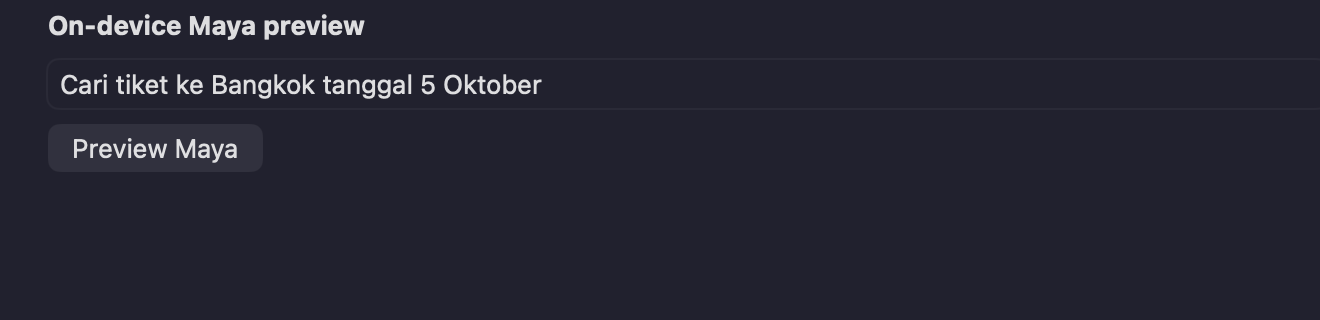
Click Preview Maya. Check Preview: apple-foundation or mlx.
Worked example — Bangkok search
Traveler: Cari tiket ke Bangkok tanggal 5 Oktober
Oke, aku bantu ya. Tujuan Bangkok, berangkat 5 Oktober. Aku cari yang sesuai policy dulu, lalu kasih rekomendasi singkat. Kalau sudah ada opsi, kamu bisa minta yang lebih murah/direct, atau Ya, book kalau tawaran sudah jelas.
Siap Joanna! Meeting bisnismu di Bangkok minggu depan, cuaca 26°C, tiket sekitar 3 jutaan ya.
Invented name, purpose, weather, and price.| Also try | You should see |
|---|---|
| Maya, gue minggu depan ada meeting 3 hari di Singapore. | Indonesian; destination Singapore; no fake flight number. |
| Book Surabaya ke Denpasar tanggal 12 | New route (intake), not confirm-booking. |
| ya, book | CONFIRM restatement only if a pending offer exists. |
If the preview invents a price, name, or flight, do not publish. Tighten the voice, coach again, or Reload pack.
6. Publish or roll back
- Click Publish live (web: same action on this studio).
- Footer should read
Live Maya now …and the live pack chip updates. - Send a new WhatsApp or workspace message. Do not reuse an old turn.
Rollback restores the previous live version. Use it if Maya got too chatty or drifted into invented facts.
Publish runs an eval gate. A 409 means the pack broke a locked rule — live Maya is unchanged.
Locked rules
- Never invent prices, flight numbers, hotel names, visa rules, policy outcomes, or ticket status.
- Inventory / policy / visa claims must come from facts or tools in that turn.
- Book / pay / cancel / reschedule stay CONFIRM (never AUTO).
- Preview must not call book/pay tools.
- No traveler PII in the pack.
Apple Intelligence vs Mac Mini
| Apple Intelligence | Mac Mini AI | |
|---|---|---|
| When | Green status on native Mac / iPhone / iPad | Grey status, or this web studio |
| Coach + preview | On-device Foundation Models | /api/capability-packs/coach and /preview |
| Publish | Always the backend eval gate | |
Troubleshooting
| What you see | What to do |
|---|---|
| Grey Apple Intelligence notice | Enable it in System Settings; use My Mac, not an iPhone destination. |
API 404 / could not connect | Wrong API base, or the pack API is not on that host. Debug default is http://127.0.0.1:8787. |
| Coach / Preview / Publish disabled | Pack not loaded — fix the API, then Reload pack. |
| Preview looks great, WhatsApp does not | You did not publish, or you are looking at an old turn. |
Native app source: maya-nl-studio. Same guide in the repo: docs/user-guide.md.